Transform fragmented customer intelligence into strategic action.
Monitor brand health and resolve inbound customer inquiries across every digital touchpoint from a single environment. Cross-channel analytics link directly to your branch, store, or product lines.







Built on eBrandValue's data engine. 10+ years of augmented social intelligence across high-volume sectors.
Multi-Location Performance Analytics
Maximize resource allocation across your branch network by tracking Google Business ratings, customer sentiment, and engagement metrics inside a single view pane, whether you run a dozen sites or several hundred.
Compare side-by-side branches by ranking localized review scores across bank branches or coffee shops in custom dashboard tabs.
Catch property-level drops by mapping public sentiment changes directly to individual store profiles the moment they move.
Drill into bottlenecks by zooming from a network-wide snapshot into granular, location-by-location post insights.
Executive Reporting & Conversation Drivers
Give leadership one enterprise-wide view of service performance, sentiment, and the topics driving it, so every team works from the same numbers.
Track sentiment trends across every channel and see week-over-week movement the moment it happens.
Surface top conversation drivers so leadership knows exactly what customers are talking about, not just how they feel.
Export board-ready reports in a click, with the same numbers every team is already looking at.
Cross-Channel Publishing & Content Operations
Build posts optimized for each channel's layout and close the loop instantly. Track performance across stories, posts and videos while agents handle DMs in the same view.
One compliant calendar queues and schedules cross-channel campaigns across every major network at once.
Preview before live with platform-aware previews that catch layout and disclosure errors before posts deploy.
Resonance by reaction, tracking post-level engagement with a breakdown of likes, loves and laughter.



Real-Time Brand Amplification
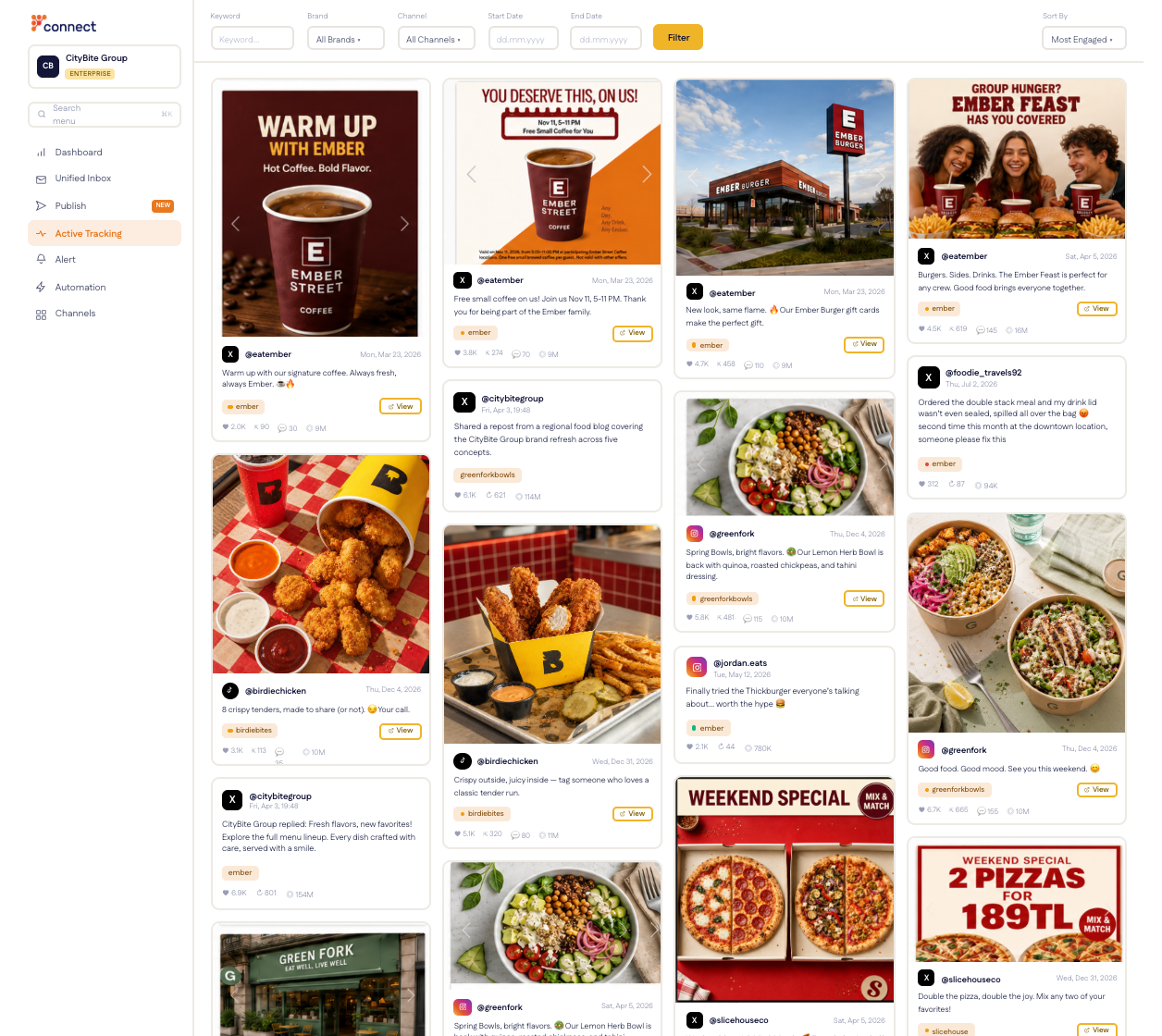
Understand cross-channel amplification in real time with the same Active Tracking feed your team uses to monitor conversations. Public mentions are sorted by interaction velocity, with video thumbnails, account metrics and user commentary in one consolidated stream.
Rank public mentions by velocity using an eight-axis Sort By that combines likes, shares, comments and views into one live score.
Audit media fast with inline video thumbnails and platform metrics embedded directly in your dashboard feed.
Jump straight to the post across TikTok, Instagram, Facebook and YouTube without leaving your workspace.
Why brands choose Connect
“User-friendly interface and reporting tools made significant contributions to our team in crisis management, generating insights, accurately understanding customer needs, and developing communication strategies.”

“The team at eBrandValue has been easy and friendly to work with, and very flexible in tailoring our platform experience to suit our needs.”

“Connect met our need for a tool to manage social media moderation. Its biggest value for us has been the ability to track Google Business reviews without gaps, with helpful support throughout the process.”



Enterprise Brand & Multi-Location FAQs
Yes. Connect is built for enterprise brands running customer service and social operations across many branches, stores, or franchise locations, where a single company-wide number can hide which specific site is driving satisfaction up or down. Conversations and reviews are tagged to the brand's own structure, whether that's a bank's branch network or a retailer's store list, so a manager reads one location's numbers as easily as the whole company's.
A branch or store that needs attention shows up the moment its numbers move, not at the next reporting cycle. Connect's Monitor tab renders every location as a tile in a live grid, sized by volume and shaded by intensity against the prior period; clicking a tile opens that location's actual reviews and conversations, sorted by Most Liked, Most Commented, or Follower Count instead of just newest.
Yes. Connect's Automation module runs boolean rules a brand's own team writes, combining conditions like keyword, author, follower count, and source channel to apply a label, sentiment, or status automatically to every matching conversation. Connect's Performance tab, the same screen a manager uses to track CSAT and agent response times, also carries a System User entry that shows exactly which labels came from automation versus which a human agent added, so a manager can see how much of the classification load the rules are actually carrying.
Connect can integrate with a brand's CRM or contact center, but that's scoped as a custom, enterprise-tier project built around the brand's own systems, not a plug-and-play connector. Within Connect itself, each channel handle stays its own record rather than merging a customer's identity across channels, a deliberate compliance stance for banks and other regulated brands rather than a missing feature.
Connect organizes itself around how the business is actually structured rather than a fixed template: a bank gets a Branches view, a retailer gets a store-by-store view, each with its own Automation rule library and Monitor tile grid. It's also built on eBrandValue's data engine, which has processed brand-intelligence data for Fortune 500 clients since 2015, so the classification and sentiment models underneath Connect carry over a decade of production data rather than starting fresh per customer.
See how Connect works for your brand.
Book a demo in a live workspace configured around your branches, stores, teams and reporting.
Book a demo →