Social Media Alerts That Actually Help
How to set keyword, volume and follower alert rules from a normal week and route each alert to the team that owns it.
 Nov. 6, 2026
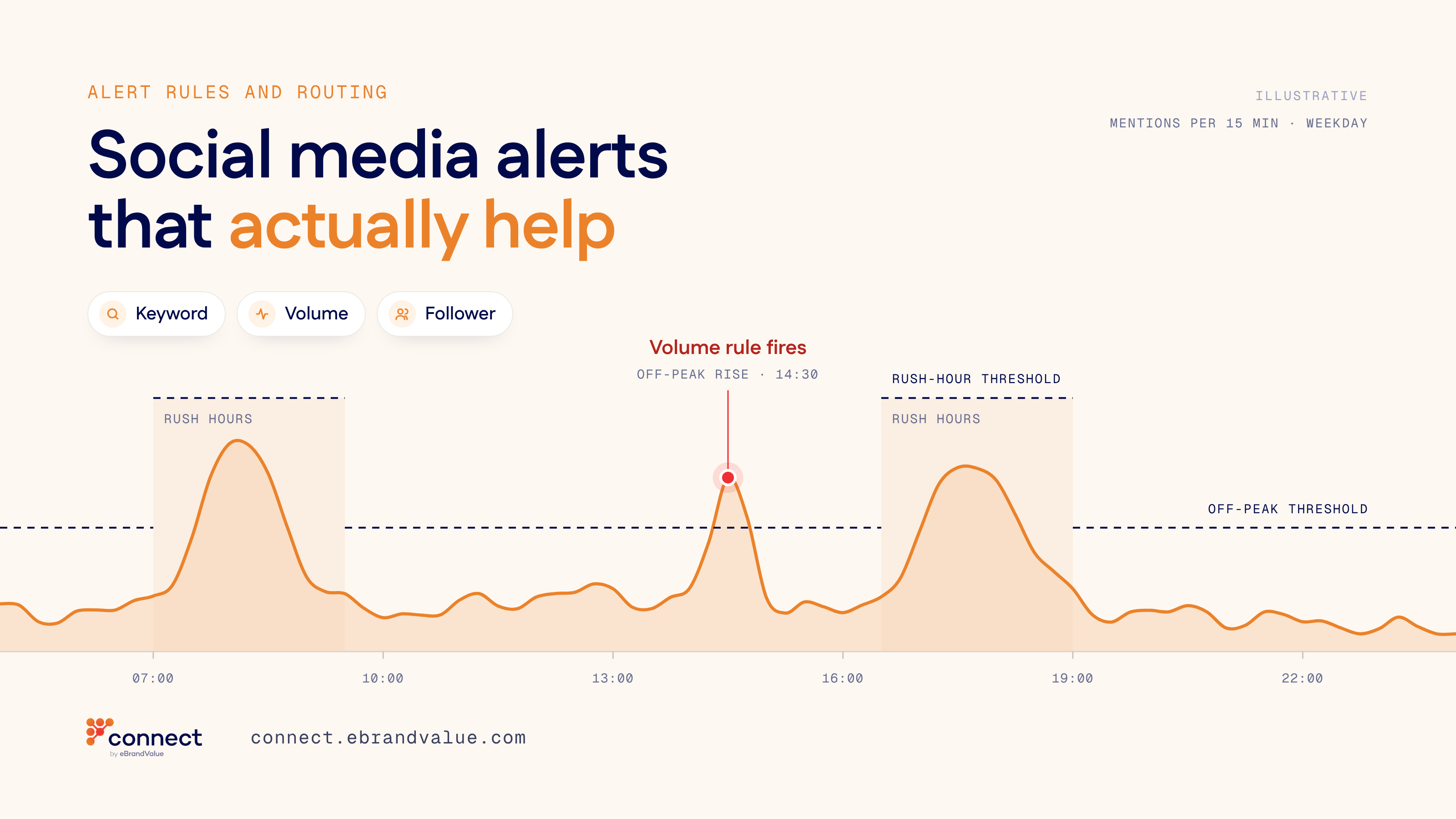
Which rules to set and who should get them: keyword, volume and follower rules built from a normal week, each routed to the team that owns the issue.
Most social media teams set up their first alert on a bad day. Someone adds a few keywords, enters a shared mailbox as the recipient and moves on. The rule then stays unchanged for a year. Within weeks, the alert emails arrive so often that people file them without reading them.
An alert is useful only if a specific person reads it and knows what to do next. That depends on three settings most teams rarely revisit: what the rule listens for, how much activity it takes to fire and who receives it. All three are easier to get right in a quiet week than in the middle of an incident.
A Tuesday at a city transit operator
Take a fictional city transit operator, whose social care team answers questions about delays, fares, lost and found and station facilities on X, Instagram, Facebook and WhatsApp. Joanna leads the team; Callum is her senior agent. Two years ago, after a signal failure, someone created an alert for the words "delay", "canceled" and "stuck". Every match is emailed to a shared alerts mailbox that eight people can open.
On an ordinary Tuesday, the rule fires dozens of times before noon. Most matches are routine: a commuter joking that the 7:40 is late again, a local news account repeating the morning service update, a passenger writing that her train was "not delayed at all, for once".
At 08:12, a wheelchair user posts on X that the elevator at a central transfer station has been out of service since Saturday and that she has missed a hospital appointment. At 08:30, a local journalist with a large following reposts it. The post contains none of the three keywords. Callum finds it at 11:05 while looking for something else in the mentions feed. By then, the station team has already heard about it from the press office.
Healthcare has a name for this pattern. In its Sentinel Event Alert 50 on medical device alarm safety (2013), The Joint Commission described clinicians who become desensitized to constant alarms and called the result alarm fatigue. The alert cites estimates that between 85 and 99 percent of alarm signals do not require clinical intervention. Its recommendations include a process for safe alarm management and response, and default alarm settings and limits appropriate for each care area.
Joanna's rule shows both symptoms. It fires too often for anyone to own it, and its keywords missed the post that mattered most that morning.
Three rules, each with one job
In a quiet week, Joanna and Callum replace the single rule with three types of rule.
Keyword rules describe a known issue that has an owner. Instead of one broad list, the team writes one rule per issue. The accessibility rule listens for "elevator", "escalator", "accessible" and "out of service" next to a station name. The fare rule listens for "charged twice", "card reader" and "gate not opening". Exclusions remove known noise, such as the operator's own service update account and phrases like "not delayed".
A volume rule ignores the wording. It counts mentions of the operator in a time window and fires when the count rises well above normal, which catches the problem nobody wrote a keyword for, such as a new fault that passengers describe in their own words.
The third type looks at who is posting. A complaint from an account with a large audience reaches many more people than an ordinary post. Joanna pairs a follower-count condition with the operator's name or a station name, so the rule fires on high-reach complaints and not on every post by a large account. On Tuesday, this is the rule that would have caught the journalist's repost at 08:30.
Set the threshold from a normal week
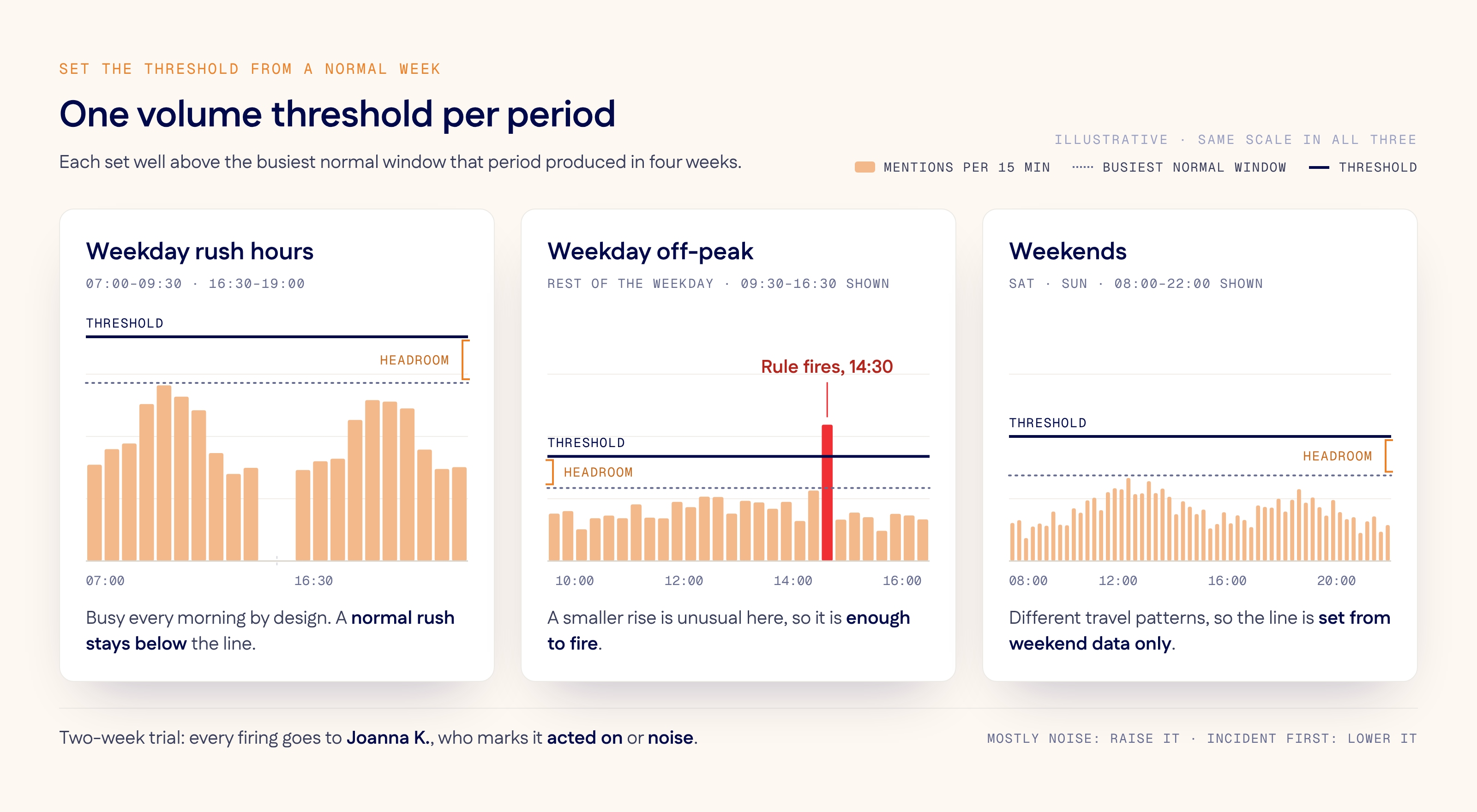
Callum pulls four weeks of mention counts in 15-minute windows and splits them into weekday rush hours, weekday off-peak and weekends. Rush hours are much busier than midday. A single threshold would either fire every morning at eight or stay silent during a real problem at two in the afternoon.
The team sets one threshold per period, each well above the busiest normal window that period produced in those four weeks, and runs a two-week trial. Every firing goes to Joanna only, and she marks each one as "acted on" or "noise". If most firings are noise, the threshold goes up or the keywords get narrower. If the team finds an incident before the rule fires, the threshold comes down.
In Connect, these rules are set up in Brand Safety & Automation. Teams can set keyword, post-volume and follower-count thresholds, combine conditions such as keyword, author, channel and follower count, and exclude specific terms or accounts. A rule can run always, only on weekdays, only on weekends or within a custom date range, and repeat at an interval such as every 5, 15 or 30 minutes. Every alert is logged next to the rule that triggered it, with a timestamp and the condition that caused it, which gives Joanna the record she needs for the trial review.
Give every alert an owner
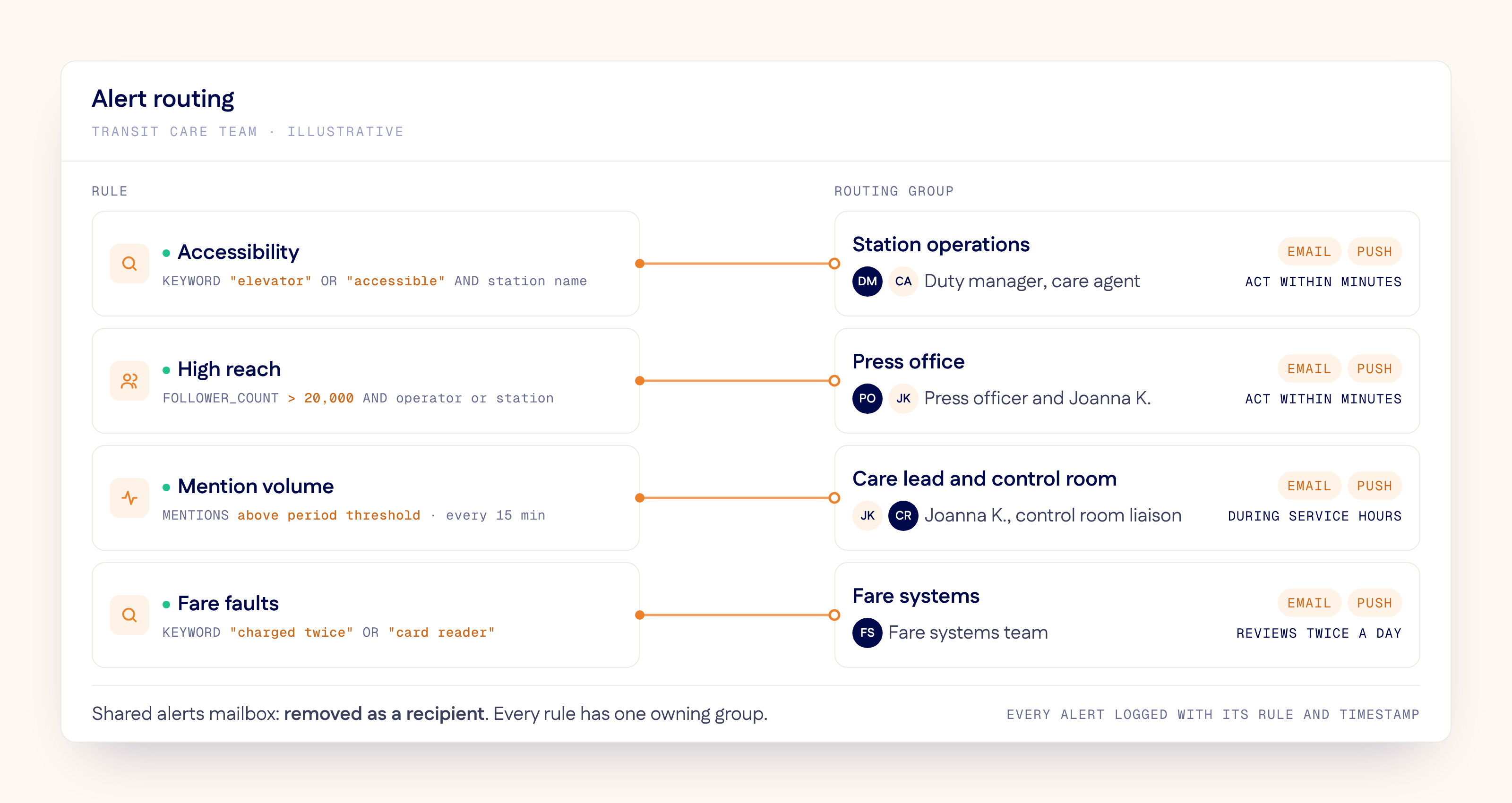
The second change is routing. The shared mailbox is removed as a recipient, and each rule goes to the group that can act on it:
| Rule | Listens for | Goes to | Expected response |
|---|---|---|---|
| Accessibility | "elevator", "escalator", "accessible" or "out of service" next to a station name | Station operations duty manager and a care agent | Within minutes |
| High reach | A follower count above a set level, with the operator's name or a station name | Press office and Joanna | Within minutes |
| Volume | Mentions of the operator above the threshold for that period | Joanna and the control room liaison | During service hours |
| Fare | "charged twice", "card reader", "gate not opening" | Fare systems team | Reviewed twice a day |
In Connect, stakeholder routing groups receive alerts by issue type, each match arrives as an email and a push notification, and alert digests link each mention directly into the workspace. The groups differ only in the response they agree to. A volume firing during service hours can be the start of an incident, and what happens in the first hour after the volume rule fires needs a playbook of its own.
The duty manager decides what happens at the station, but the care team still owes the passenger a reply on the channel she used. From the alert, Joanna can assign, label or close the related conversations together in the Unified Workspace, so the passenger's first response time does not depend on someone scrolling past the post.
Once a month, Joanna checks how often each rule fired, how many firings were acted on and which incidents arrived without an alert. A rule without an owner is retired. A rule for a planned event, such as a weekend line closure or a fare change, is scheduled for that date range so it switches off on its own.
To see how a keyword, a volume and a follower rule each reach the team that owns them, take the product tour or book a demo and set up the first rules for your own accounts with us.
Frequently asked questions
How do you reduce alert fatigue in social media monitoring?
Write narrow rules that each map to one issue and one owner, and exclude known noise such as your own accounts. Agree with each recipient group which alerts need action within minutes and which can wait for a scheduled check. Review each rule monthly and retire the ones nobody acts on.
How do you set a threshold for a social media volume alert?
Count mentions in fixed time windows, such as 15 minutes, over several normal weeks, and split the counts by period, for example rush hours, off-peak and weekends. Set each threshold well above the busiest normal window for that period, then adjust it after a trial based on how many firings were acted on.
Who should receive social media alerts?
The team that can act on the issue, not a shared mailbox. A service fault goes to operations, a high-reach complaint to communications and a billing error to the team that owns billing, with the customer care team kept in the loop to reply to the customer.
What is the difference between a keyword alert and a volume alert?
A keyword alert fires when a post contains specific words, so it tells you what the issue is. A volume alert fires when the number of mentions in a time window rises above a set level, so it catches problems that customers describe in words you did not anticipate.
See Connect in action.
Contact us to see how our social and digital customer experience workspace can support your organization.